The National Transport and Safety Authority (NTSA) has issued a fresh notice urging Kenyan motorists whose Smart Driving Licences (Smart DLs) are ready to collect them from their designated collection centres.
In a notice issued on Friday, October 16, 2026, the authority reminded applicants to visit the centres where they originally registered their biometric details to collect their driving licence cards.
NTSA stated:
“We urge our esteemed clients to collect their Smart DLs from the centres where their biometrics were captured.”
The authority also reminded motorists to carry their original national identity cards for verification and warned against using brokers or intermediaries to access its services.
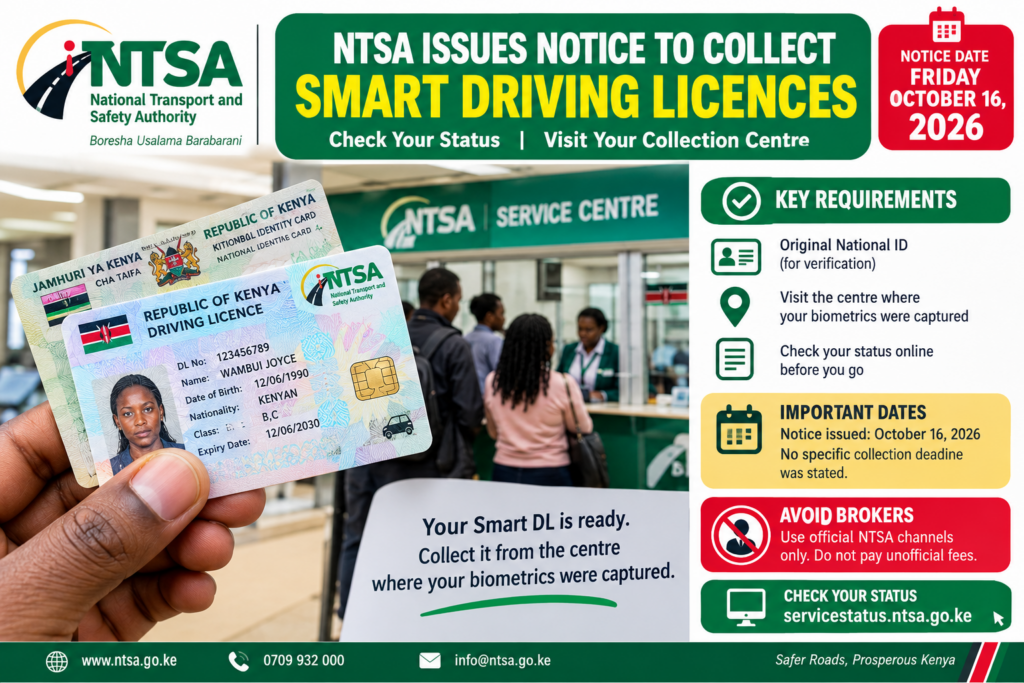
The latest announcement is important for drivers who applied for new Smart Driving Licences, renewed their existing licences, or have been waiting for their cards to be processed.
Motorists can check whether their documents are ready through the official NTSA status-checking portal before travelling to a collection centre.
Key Highlights of the NTSA Smart Driving Licence Collection Notice
Here are the main details motorists should know about the latest NTSA announcement.
| Information | Details |
|---|---|
| Issuing authority | National Transport and Safety Authority (NTSA) |
| Notice date | Friday, October 16, 2026 |
| Document | Smart Driving Licence (Smart DL) |
| Who should collect? | Applicants whose Smart DLs are ready |
| Collection location | The centre where the applicant’s biometrics were captured |
| Main requirement | Original national ID for verification |
| How to check status | NTSA online service-status portal |
| Collection deadline | No specific deadline stated in the notice |
| Brokers | Motorists are advised to avoid brokers |
| Official assistance | NTSA offices and official communication channels |
The notice does not establish a new application deadline. Instead, it asks motorists whose licences have already been processed to collect them.
1. Who Qualifies to Collect an NTSA Smart Driving Licence?
The latest notice targets applicants whose Smart Driving Licences have been processed and are awaiting collection.
You may qualify to collect your licence if you fall into one of the following categories.
A. Applicants for New Smart Driving Licences
Motorists who completed the required application process, attended their biometric appointments, and received confirmation that their licences are ready can visit their designated collection centres.
Before travelling, confirm that your application status indicates that the document is available for collection.
B. Motorists Who Renewed Their Driving Licences
Drivers who applied to renew their Smart Driving Licences and have completed the applicable renewal process should check whether their replacement or renewed cards are ready.
If your renewal is still being processed, you may need to wait for confirmation from NTSA.
C. Applicants Who Have Waited for Their Cards
Some motorists may have completed their applications and biometric registration but waited longer than expected for their physical cards.
If you are among these applicants, check your document status through the official NTSA portal to establish whether your licence is ready.
D. Applicants Who Received a Collection Notification
If NTSA has sent you a message confirming that your Smart DL is ready, follow the instructions and visit the designated collection centre with your original national ID.
However, it is advisable to verify the collection location and status through official channels if the message is unclear.
Important: Completing an application or biometric registration does not automatically mean that the physical licence is ready. Confirm the status before making the journey.
2. Requirements for Collecting an NTSA Smart Driving Licence
Motorists should prepare the necessary identification documents before visiting an NTSA collection centre.
Original National Identity Card
The original national ID is the main document specifically highlighted in the October 16 notice.
NTSA requires the identification document to verify that the person collecting the licence is the applicant.
Do not rely on a photocopy or a photograph of your ID when the notice specifically requires the original document.
Confirmation That the Licence Is Ready
Check the status of your Smart DL before travelling.
This can help you avoid unnecessary transport expenses and long queues at the collection centre.
Details of Your Application
It is helpful to have your application details or any relevant notification available in case the officer needs additional information to locate your record.
This is a practical precaution rather than a separately announced mandatory document.
Visit the Correct Collection Centre
NTSA has specifically instructed applicants to collect their Smart DLs from the centres where their biometric details were captured.
Do not assume that you can collect the card from any NTSA office or Huduma Centre.
If you cannot remember the centre you visited, check the online status information or contact NTSA for clarification before travelling.
Collection checklist:
- Original national identity card.
- Confirmation that the Smart DL is ready.
- Relevant application or notification details, if available.
- Information identifying the designated collection centre.
Contact NTSA before your visit if you have an unusual situation, such as a missing national ID or conflicting application details.
3. How to Check Whether Your NTSA Smart Driving Licence Is Ready
Motorists can check their Smart Driving Licence status online through NTSA’s official uncollected-documents portal.
The service helps applicants establish whether their cards are awaiting collection.
Step 1: Visit the Official NTSA Status Portal
Open the official NTSA service-status website:
Make sure the website address is correct before entering personal information.
Step 2: Select Smart Driving Licence
Choose the Smart DL option from the available document categories.
The portal also supports status checks for other documents, including vehicle number plates and logbooks.
Step 3: Enter Your National ID Number
Enter your national identification number in the required field.
Check the number carefully to avoid errors when submitting your search.
Step 4: Submit Your Details
Follow the instructions displayed on the portal to check whether your Smart DL appears among the uncollected documents.
Step 5: Confirm the Collection Details
If the system indicates that your licence is ready, check the collection information and visit the designated centre.
If the document does not appear, do not immediately assume that your application has been rejected. It may still be undergoing processing, or you may need assistance to establish its status.
Step 6: Request Assistance if Necessary
If your licence remains unavailable despite a prolonged delay, use the portal’s follow-up option or contact NTSA through its official channels.
The online status-checking service can help motorists avoid unnecessary visits and reduce their reliance on intermediaries.
4. Where Should You Collect Your NTSA Smart Driving Licence?
According to the October 16, 2026 notice, applicants should collect their Smart DLs from the centres where they registered their biometric details.
Biometric registration involves capturing identifying information used in processing the licence.
Your designated collection centre may be an NTSA service location or another authorised centre used during your application.
The most important point is to follow the collection location indicated by NTSA rather than choosing a centre based solely on convenience.
Can You Collect Your Smart DL From Any NTSA Office?
You should not assume that every NTSA office holds your licence.
The latest notice directs applicants to the centres where their biometrics were captured.
If you have moved to another town since applying, contact NTSA to establish whether another collection arrangement is possible before making travel plans.
What if You Have Forgotten Your Biometric Centre?
Use the official status-checking service and contact NTSA if you need clarification.
Providing accurate application details will help the authority identify the relevant record and advise you on the appropriate collection point.
5. NTSA Smart Driving Licence Collection Dates and Deadline
The latest notice was issued on Friday, October 16, 2026.
NTSA urged motorists whose Smart DLs were ready to visit their designated collection centres and pick up their cards.
However, the notice did not announce a specific final collection date for the Smart Driving Licences covered by the announcement.
Motorists should therefore distinguish between the date of the public notice and an official collection deadline.
Important Dates to Know
| Date or period | What motorists should know |
|---|---|
| October 16, 2026 | NTSA issued the latest collection reminder |
| October 17, 2026, onward | Applicants can check their status and arrange collection if their cards are ready |
| Final collection deadline | No specific deadline was stated in the notice |
| Individual collection date | Depends on whether the applicant’s licence has been processed and is available |
Applicants whose licences are ready should avoid unnecessary delays.
If you have been waiting for your card, check the status rather than assuming that every pending application has already been processed.
For applicants whose documents are not ready, the October 16 announcement does not mean that they can immediately collect their cards.
6. NTSA Warns Motorists Against Using Brokers
Another important message accompanying the collection notice is NTSA’s warning against dealing with brokers or intermediaries.
The authority has encouraged motorists to use its official systems to access services directly.
Brokers may claim that they can speed up licence processing, secure preferential treatment, or arrange collection for an additional payment.
Such claims should be treated cautiously.
Using an unauthorised intermediary can expose motorists to fraudulent payment requests, misuse of personal information, or false promises.
How to Avoid NTSA Licence Collection Scams
Follow these precautions:
- Use official NTSA platforms: Check your licence status through the official website.
- Do not pay for guaranteed collection: Be suspicious of anyone promising to release your licence in exchange for an unofficial payment.
- Protect your personal information: Do not disclose your NTSA account credentials, passwords, or verification codes to strangers.
- Verify unusual messages: Confirm suspicious collection instructions through official NTSA contacts.
- Keep your payment records: If you have a genuine application or renewal transaction, retain the relevant receipt.
- Avoid fake websites: Check the web address carefully before submitting your national ID number.
- Report suspicious conduct: Contact NTSA if someone claims to have special access to your licence or requests an unofficial fee.
You do not need to hire a broker simply to check whether your Smart DL is ready.
7. What Is an NTSA Smart Driving Licence?
A Smart Driving Licence is a modern driving licence card introduced in Kenya to replace the older red booklet-style licence.
The card incorporates security features and stores relevant driver information in a format that supports identification and verification.
It is part of the government’s efforts to modernise transport-related services and improve the management of driving records.
The Smart DL process involves an application, the required verification steps, biometric registration where applicable, processing, and eventual collection.
Applicants should follow the instructions issued by NTSA throughout the process.
Why Is the Smart Driving Licence Important?
The Smart DL provides a standardised identification document for licensed motorists.
It also supports the verification of driving licence information by the relevant authorities.
Drivers should ensure that the information recorded on their cards is accurate and that their licence remains valid for the vehicle categories they are authorised to operate.
If you identify an error on your card, contact NTSA through its official channels for guidance on correcting the record.
8. What Should You Do if Your Smart DL Is Not Ready?
Not every applicant will find their card available for collection immediately.
If your licence is still pending, consider the following steps.
Check the Online Status Again
Visit the official status portal and search using the required identification details.
Make sure you have selected the correct document category and entered your ID number accurately.
Confirm Your Application Details
Review your application or payment records to establish whether you completed the required steps.
If you are unsure whether additional action is required, ask NTSA for clarification rather than submitting another application unnecessarily.
Contact NTSA
If the online system does not provide a clear answer, contact the authority using its official contact details.
You can also visit an NTSA office if your concern requires in-person assistance.
Submit a Follow-Up Request
The official service-status portal provides an option for applicants to raise concerns about their Smart DL, number plate, or logbook applications.
Use this option if your document has been delayed or your application status requires further clarification.
Keep any relevant reference numbers and correspondence so that you can follow up more effectively.
9. NTSA Official Contacts for Smart Driving Licence Queries
Motorists who need help with delayed or uncollected Smart DLs can contact the National Transport and Safety Authority directly.
The following official contact information is published by NTSA:
| Contact method | Details |
|---|---|
| General enquiries | info@ntsa.go.ke |
| Driving licence queries | dlqueries@ntsa.go.ke |
| Telephone | 0709 932 000 |
| Complaints | complaints@ntsa.go.ke |
| Headquarters | 316 Upper Hill Chambers, 2nd Ngong Avenue, Upper Hill, Nairobi |
| Online status checking | https://servicestatus.ntsa.go.ke/ |
For official contact information and further assistance, visit the NTSA website.
When contacting NTSA about a delayed licence, explain when you applied, the stage you reached, and the issue you are experiencing.
Avoid sharing unnecessary personal information in public social media posts.
10. Helpful Tips Before Visiting an NTSA Collection Centre
To make the collection process easier, consider these practical tips.
Check Your Status Before Travelling
Do not make a long journey without first confirming whether your licence is ready.
Carry Your Original ID
This is the principal identification requirement highlighted in the latest notice.
Visit the Correct Centre
Confirm that you are going to the location where your biometrics were captured or the collection centre indicated by NTSA.
Plan Your Visit During Official Working Hours
Check the operating hours of your designated centre before travelling, especially if you intend to visit on a public holiday or near the end of the working day.
Keep Your Phone Accessible
If NTSA has sent you a collection notification, keep the message available in case you need to refer to it.
However, the notification does not replace the requirement to carry your original ID.
Do Not Pay Unofficial Fees
Avoid paying brokers or individuals who promise to release your licence outside the official process.
Inspect the Card Before Leaving
Once you receive your Smart DL, check that the identifying details and authorised vehicle categories are correct.
If you notice an error, seek guidance from NTSA before relying on the incorrect information.
Frequently Asked Questions About the NTSA Smart Driving Licence Collection Notice
1. When Did NTSA Issue the Latest Smart DL Collection Notice?
NTSA issued the latest notice on Friday, October 16, 2026, urging motorists whose Smart Driving Licences were ready to collect them.
2. Where Can I Collect My NTSA Smart Driving Licence?
You should collect your Smart DL from the centre where your biometric details were captured, following the instructions issued by NTSA.
3. What Do I Need to Collect My Smart DL?
You should carry your original national identity card for verification. It is also helpful to have your application details or collection notification available.
4. How Can I Check Whether My Driving Licence Is Ready?
Visit the official NTSA uncollected-documents portal, select Smart DL, and enter your national ID number as instructed.
5. Is There a Deadline for Collecting the Smart DL?
The October 16, 2026 notice did not specify a final collection deadline for the Smart Driving Licences covered by the announcement. Applicants should check official NTSA communications for any subsequent deadlines.
6. Can I Collect My Driving Licence From Any NTSA Office?
You should not assume that you can collect it from any office. NTSA has directed applicants to the centres where they registered their biometrics.
7. What Happens if My Smart DL Is Not Ready?
Check your status online. If your application remains pending, contact NTSA or submit a follow-up request through the official status portal.
8. Do I Need a Broker to Collect My Smart Driving Licence?
No. NTSA encourages applicants to access its services directly and has warned motorists against using brokers or intermediaries.
9. What Should I Do if I Have Lost My National ID?
Contact NTSA before visiting the collection centre to establish what identification documents, if any, can be accepted in your circumstances. Do not assume that a photocopy or a photograph of your ID will be sufficient.
10. How Can I Contact NTSA About a Delayed Driving Licence?
You can email dlqueries@ntsa.go.ke or call 0709 932 000. You can also visit the official NTSA website for further assistance.
The NTSA Smart Driving Licence collection notice issued on October 16, 2026, is an important reminder to Kenyan motorists who have been waiting for their driving licence cards.
The authority has instructed applicants whose Smart DLs are ready to collect them from the centres where their biometric details were captured.
Before travelling, check your application status online and carry your original national identity card for verification. If your licence is not ready or you experience difficulties, contact NTSA through its official channels.
Motorists should also avoid brokers and anyone demanding unofficial payments to facilitate collection.
The most important steps are simple: check your Smart DL status, confirm the collection centre, carry your original ID, and follow NTSA’s official instructions.