If you have money in your Co-operative Bank of Kenya account and want to move it to your M-Pesa wallet, you can do so conveniently from your mobile phone without visiting a bank branch.
Co-op Bank customers can transfer money from their eligible bank accounts to M-Pesa using Co-op Bank’s *667# mobile banking service or the Co-op Bank mobile app.
This guide explains how to transfer money from Co-op Bank to M-Pesa, the USSD code to use, applicable charges, how long transfers take, what to do if the transaction fails, and how to reverse a transfer sent to the wrong number.
Note: The exact transaction charges and mobile-banking menus can change. Always review the transaction details and fee displayed before confirming a transfer.
Quick Answer: How to Transfer Money from Co-op Bank to M-Pesa
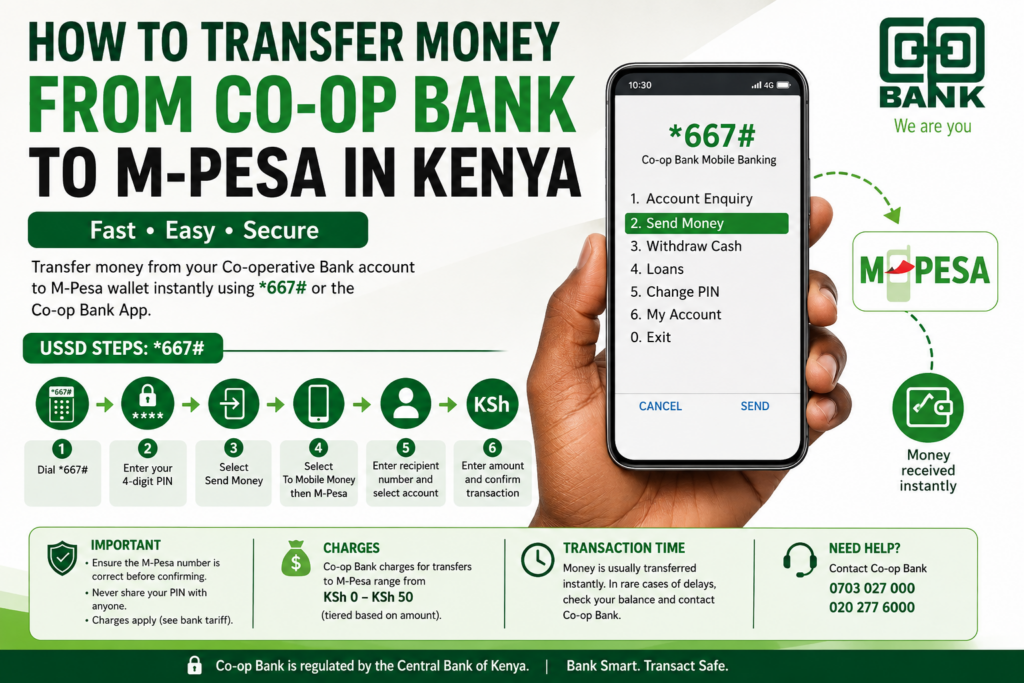
The simplest way to send money from Co-op Bank to M-Pesa is through *667#.
Steps:
Dial *667# → Enter your PIN → Send Money → To Mobile Money → M-Pesa → Select recipient → Select account → Enter amount → Confirm.
Once the transaction is successfully completed, the money should be credited to the selected M-Pesa number.
What Is the Co-op Bank to M-Pesa USSD Code?
The official Co-op Bank mobile banking USSD code is:
*667#
You can use this service to access various Co-op Bank mobile-banking services, including transferring money to mobile-money wallets.
One of the biggest advantages of USSD banking is that you do not necessarily need an internet connection. This makes it useful when you have a basic phone, limited mobile data, or poor internet access.
How to Transfer Money from Co-op Bank to M-Pesa Using *667#
If you want to move money from your Co-op Bank account to your own M-Pesa number, follow these steps.
Step 1: Dial *667#
Using the mobile number registered with your Co-op Bank account, dial:
*667#
Step 2: Enter Your PIN
Enter your 4-digit Co-op Bank/MCo-op Cash PIN when prompted.
Keep your PIN private. Do not share it with anyone claiming to be a bank employee or mobile-money agent.
Step 3: Select “Send Money”
From the menu that appears, select:
Send Money
Step 4: Select “To Mobile Money”
Choose:
To Mobile Money
This option allows you to transfer money from your Co-op Bank account to a mobile-money wallet.
Step 5: Select M-Pesa
Choose:
M-Pesa
You may also see other mobile-money options depending on the services currently supported by Co-op Bank.
Step 6: Choose the Recipient
You can select whether you are sending the money to:
- Your own mobile number, or
- Another person’s mobile number.
If you are sending money to your own M-Pesa wallet, make sure the number displayed is correct.
Step 7: Select Your Co-op Bank Account
Choose the Co-op Bank account from which you want the money deducted.
Step 8: Enter the Amount
Enter the amount you want to transfer.
For example:
KSh 1,000
or
KSh 5,000
Make sure your account has enough money to cover both the transfer and any applicable charges.
Step 9: Confirm the Transaction
Carefully review:
- Recipient’s phone number
- Amount
- Bank account
- Transaction fee, if applicable
If everything is correct, confirm the transaction using your PIN.
Step 10: Wait for Confirmation
After successful processing, you should receive a transaction confirmation.
The money should then be available in the recipient’s M-Pesa wallet.
How to Send Money from Co-op Bank to Someone Else’s M-Pesa
You do not have to transfer money only to your own M-Pesa number.
Co-op Bank’s mobile-banking instructions allow customers to send money to another person’s mobile-money number.
For example, you can send money from your Co-op Bank account to:
- A family member
- A friend
- A business partner
- A supplier
- Another person who uses M-Pesa
The process is similar:
Dial *667# → Send Money → To Mobile Money → M-Pesa → Enter/select recipient → Select account → Enter amount → Confirm.
Important Safety Tip
Always double-check the recipient’s phone number before entering your PIN.
A mistake can result in money being sent to the wrong person, and recovering funds may take time.
How to Transfer Money from Co-op Bank to M-Pesa Using the App
If you have a smartphone and internet access, you can also use the Co-op Bank App.
The general process is:
- Open the Co-op Bank App.
- Log into your account.
- Select the money-transfer option.
- Choose mobile money.
- Select M-Pesa.
- Enter or select the recipient’s phone number.
- Choose the Co-op Bank account to debit.
- Enter the amount.
- Review the transaction.
- Confirm the transfer.
The exact appearance of the app and menu names may change as Co-op Bank updates its mobile-banking platform.
For security, only download and use the official Co-op Bank application.
How Much Does Co-op Bank Charge to Send Money to M-Pesa?
One of the most common questions is:
“How much does it cost to transfer money from Co-op Bank to M-Pesa?”
Co-op Bank’s published tariff information has listed tiered charges of KSh 0 to KSh 50 for transfers to M-Pesa and Airtel Money, depending on the transaction amount.
Because bank charges can be revised, the amount shown during your transaction should be treated as the most useful confirmation of the current applicable fee.
| Service | Charge |
|---|---|
| Co-op Bank to M-Pesa/Airtel Money | KSh 0–KSh 50, depending on the applicable tier |
| Balance inquiry | Free according to published tariff information |
| Other banking services | Varies |
Tip: Before entering your PIN, carefully check the displayed transaction amount and fee.
How Long Does Co-op Bank to M-Pesa Take?
In normal circumstances, a successful Co-op Bank-to-M-Pesa transfer should be processed through the mobile-banking system and the recipient should receive a confirmation.
However, transactions can occasionally experience delays because of:
- Mobile network problems
- Bank system maintenance
- M-Pesa system issues
- Temporary connectivity problems
- Incorrect transaction details
If your Co-op Bank account has been debited but the M-Pesa balance has not been updated, do not immediately repeat the transaction.
First check your SMS notifications and account transaction history. If the issue continues, contact Co-op Bank.
Can You Transfer Money from Every Co-op Bank Account to M-Pesa?
According to Co-op Bank’s published information, customers can transfer money from Co-op Bank accounts to M-Pesa, except Hekima accounts.
If your account does not appear as an option when using mobile banking, you should contact Co-op Bank for clarification rather than attempting to bypass the restriction.
What Do You Need to Transfer Money from Co-op Bank to M-Pesa?
Before starting the transaction, make sure you have:
- An active Co-op Bank account
- A mobile number registered for Co-op mobile banking
- Your Co-op Bank mobile-banking PIN
- The recipient’s M-Pesa number
- Sufficient money in your account
- Enough money to cover any applicable transaction charges
If you have forgotten your PIN or your mobile number is not registered for mobile banking, you may need assistance from Co-op Bank.
What If the Co-op Bank *667# USSD Code Is Not Working?
Sometimes USSD services can temporarily become unavailable.
If *667# does not work, try:
- Checking that you have network coverage.
- Restarting your phone.
- Trying again after a few minutes.
- Making sure you are using the mobile number registered with Co-op Bank.
- Using the Co-op Bank App if you have internet access.
- Contacting Co-op Bank customer support if the problem continues.
Avoid giving your banking PIN to anyone who claims they can fix the problem remotely.
What Happens If You Send Co-op Bank Money to the Wrong M-Pesa Number?
This is an important issue because entering the wrong number can send money to an unintended recipient.
If you realize that you have transferred money to the wrong M-Pesa number, contact Co-op Bank immediately.
The bank’s published guidance says customers should contact its Contact Centre as soon as possible to request assistance with a reversal, particularly before the recipient withdraws or uses the money.
Do not wait unnecessarily.
Keep your transaction confirmation SMS and provide the bank with the relevant transaction details when requested.
Co-op Bank Customer Care Contacts
If you experience a problem with a transfer, you can contact Co-op Bank through its official customer-service channels.
The bank has published the following Contact Centre numbers:
0703 027 000
020 277 6000
Always verify customer-care contacts through the bank’s official website rather than relying on numbers sent to you through suspicious SMS messages or social-media accounts.
How to Check Your Co-op Bank Balance Before Sending Money
If you are unsure whether you have enough money in your account, you can check your balance through mobile banking.
Generally:
- Dial *667#.
- Enter your PIN.
- Select Account Enquiry.
- Choose Balance.
- Select the account you want to check.
Knowing your available balance can help prevent failed transfers.
Co-op Bank to M-Pesa vs Co-op Bank ATM Withdrawal
There are several ways to access money in your Co-op Bank account.
| Feature | Co-op Bank → M-Pesa | ATM Withdrawal |
|---|---|---|
| Requires an ATM visit | No | Yes |
| Requires internet | No when using USSD | No |
| Money goes to M-Pesa | Yes | No |
| Gives you physical cash | No | Yes |
| Useful for mobile payments | Yes | Not directly |
| Can be initiated from phone | Yes | Cardless option may be available |
If you need money for M-Pesa payments, sending money or paying bills, transferring to M-Pesa may be more convenient.
If you specifically need physical cash, you may prefer an ATM or eligible Co-op Bank agent withdrawal.
How to Withdraw Co-op Bank Money as Cash Without an ATM Card
Co-op Bank also provides mobile-based options for withdrawing cash through eligible agents and ATMs.
Using mobile banking, customers can access cardless withdrawal services where available.
A typical process may involve:
Dial* 667# → Withdraw Cash → Choose Agent or ATM → Select account/beneficiary → Enter amount → Confirm.
This is different from transferring money to M-Pesa because the objective is to receive physical cash.
Why Transfer Money from Co-op Bank to M-Pesa?
Moving money from your bank account to M-Pesa can be useful because M-Pesa is widely accepted for everyday transactions in Kenya.
You can use your M-Pesa balance to:
- Send money to another person
- Pay merchants
- Pay bills
- Buy airtime
- Make online payments where M-Pesa is supported
- Withdraw cash from an M-Pesa agent
- Pay for everyday services
For many Kenyans, transferring money to M-Pesa can therefore be more convenient than visiting a bank branch or ATM.
Common Problems When Sending Money from Co-op Bank to M-Pesa
1. Insufficient funds
Your account may not have enough money to cover the amount and applicable charges.
Solution: Check your balance before transferring.
2. Wrong M-Pesa number
Entering an incorrect number can send money to the wrong recipient.
Solution: Verify the number carefully before confirmation.
3. USSD unavailable
The *667# service may temporarily fail because of network or system issues.
Solution: Try again later or use the Co-op Bank App.
4. Delayed transaction
A successful transfer may occasionally take longer than expected because of system or network problems.
Solution: Check your account and M-Pesa messages before attempting another transfer.
5. Forgotten PIN
Without your correct mobile-banking PIN, you may not be able to complete the transaction.
Solution: Use the official Co-op Bank channels to resolve the issue.
How to Safely Transfer Money from Co-op Bank to M-Pesa
Mobile banking is convenient, but you should take basic security precautions.
Never share your PIN
Your Co-op Bank PIN should remain confidential.
Co-op Bank staff should not require you to disclose your personal banking PIN over the phone.
Verify the number
Before confirming, check the M-Pesa number carefully.
Avoid suspicious links
Do not click links in suspicious SMS messages claiming to be from Co-op Bank or M-Pesa.
Use official channels
Use *667#, the official Co-op Bank App and verified Co-op Bank customer-care channels.
Don’t send money to “activate” a transfer
Be cautious if someone claims you must first send money to unlock, activate or release a bank-to-M-Pesa transfer.
Frequently Asked Questions About Co-op Bank to M-Pesa
What is the Co-op Bank USSD code?
The Co-op Bank mobile banking USSD code is *667#.
How do I transfer money from Co-op Bank to M-Pesa?
Dial *667#, enter your PIN, select Send Money, choose To Mobile Money, select M-Pesa, enter the recipient details and amount, then confirm.
Can I transfer Co-op Bank money to someone else’s M-Pesa?
Yes. Co-op Bank’s mobile-banking service supports transfers to another person’s mobile-money number.
Can I transfer money from Co-op Bank to my own M-Pesa?
Yes. You can select your own registered mobile number as the recipient.
Does transferring money from Co-op Bank to M-Pesa cost money?
It can. Co-op Bank’s published tariff information lists tiered charges for mobile-money transfers. Always check the current fee displayed before confirmation.
Can I use the Co-op Bank App to send money to M-Pesa?
Yes. The Co-op Bank App provides mobile-banking functionality, including transfers to mobile-money services.
Can I transfer money from a Hekima account to M-Pesa?
Co-op Bank’s published information states that transfers to M-Pesa are available from eligible Co-op Bank accounts except Hekima accounts.
What should I do if money is deducted but M-Pesa does not receive it?
Check your transaction confirmation and account history. Do not immediately repeat the transaction. If the money remains missing, contact Co-op Bank through its official customer-support channels.
Can I reverse a wrong Co-op Bank-to-M-Pesa transaction?
If you sent money to the wrong number, contact Co-op Bank immediately and request assistance with the reversal. Recovery may depend on the circumstances and whether the recipient has already withdrawn or used the funds.
Final Verdict: Is Co-op Bank to M-Pesa Transfer Easy?
Yes. Transferring money from Co-op Bank to M-Pesa in Kenya is a relatively simple process that can be completed from your mobile phone.
For customers using USSD, the main code to remember is:
Co-op Bank USSD: *667#
The basic process is:
*667# → Send Money → To Mobile Money → M-Pesa → Select recipient → Select account → Enter amount → Confirm.
You can also use the Co-op Bank App if you have a smartphone and internet connection.
Before completing the transaction, always confirm the recipient’s phone number, amount and applicable charges. Keep your PIN confidential and use only official Co-op Bank channels when you need assistance.